15 Loyalty Program Email Examples (With Copy-Paste Templates)
15 loyalty program emails your store should send, each with a copy-paste template, subject line ideas, and the exact trigger that sends it. Plus a metrics cheat sheet and how to automate the whole thing with Shopify Flow.
-be8365.webp&w=3840&q=95)
Summarize this post with AI
A loyalty program only works if customers remember it exists. Points sitting in an account nobody checks don't bring anyone back. The email is what does that job... It's the nudge that turns a quiet points balance into a repeat order.
Here's the case for getting these emails right. In EY's 2025 Loyalty Market Study, which surveyed more than 1,600 consumers and 350 loyalty leaders, having a loyalty program was the top reason people stayed loyal to a brand: 41% named it, ahead of product quality at 33%. The same study found 92% of consumers already belong to at least one program, and nearly half belong to five or more.
So your customers are enrolled. The question is whether your emails earn an open in a crowded inbox.
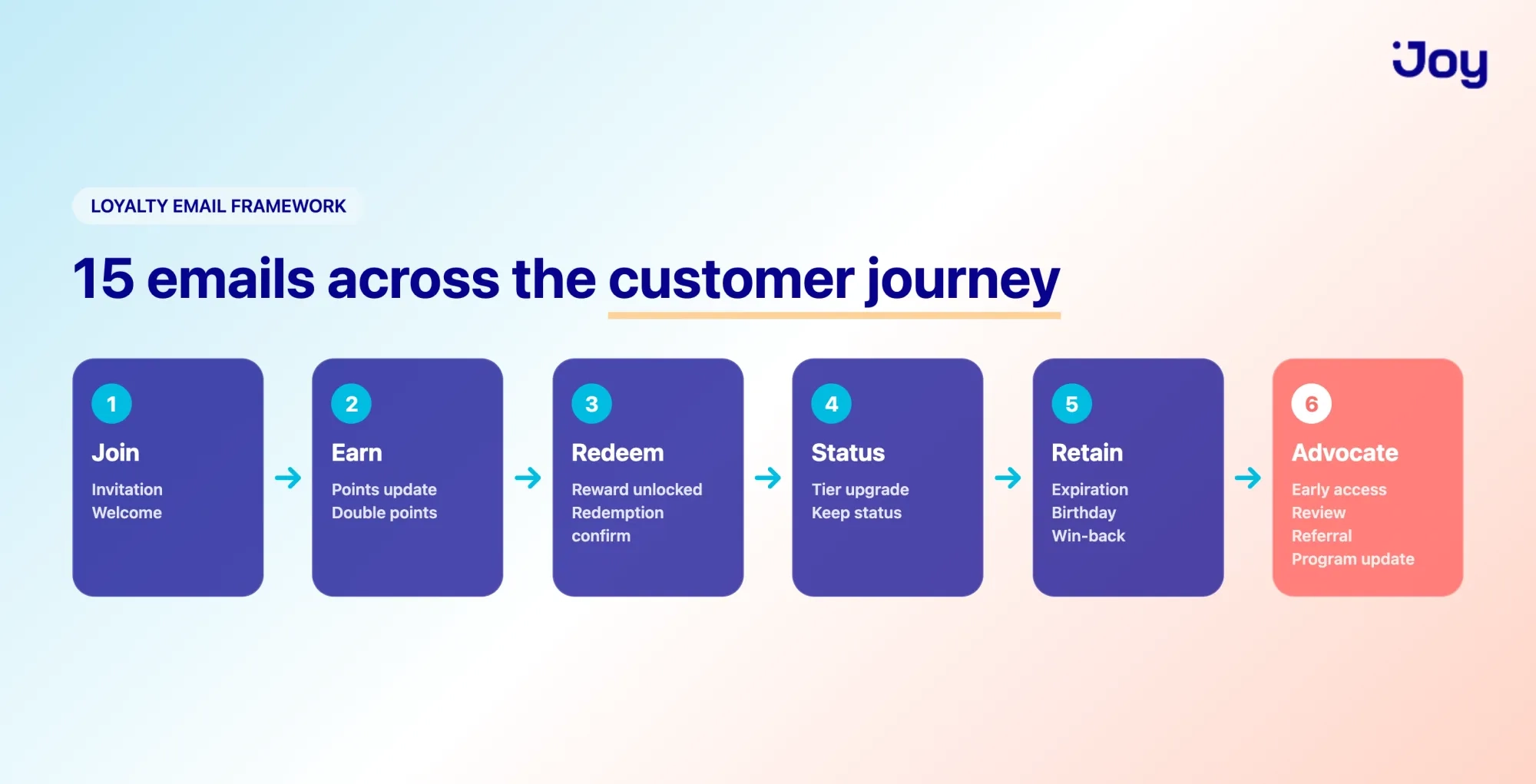
Below are 15 loyalty program email examples, organized the way a customer actually moves through your program: from joining, to earning, to redeeming, to coming back. Each one comes with a copy-paste template you can adapt, subject line ideas, and a note on when to send it.
What makes a loyalty program email work?
Three things separate a loyalty email that converts from one that gets ignored.
- It's triggered, not broadcast. The best loyalty emails fire off a customer action, sign-up, a purchase, or hitting a points threshold, not a calendar. Timing is most valuable.
- It's personal. A points balance, a tier name, a reward that's actually within reach. Generic "check out our program" emails get skipped.
- It has one job. One clear action per email. Earn your first points. Redeem before they expire. Refer a friend. Two CTAs split attention and lower clicks.
Keep those three in mind, and most of the writing takes care of itself.
The 15 loyalty program email examples
1. Invitation to join
When to send it: To customers who've already bought but haven't joined your program yet, about one to two weeks after an order. They've shown they like you. Now give them a reason to come back.
What to include:
- A nudge that they're leaving rewards on the table
- The headline benefit of joining, in one line
- An incentive to enroll (often: we'll credit points for your recent order)
Copy-paste template:
Subject: {{ first_name }}, you've been earning points without knowing it
Hi {{ first_name }},
Thanks for your recent order. Here's something you might not know: if you'd been a {{ program_name }} member, you'd have earned {{ points_from_last_order }} points on it.
Join now and we'll credit those points to your account, a head start toward your first reward.
[Join {{ program_name }} →]
{{ store_name }}
Subject line ideas:
- {{ first_name }}, you've been earning points without knowing it
- Turn your last order into rewards
- You're {{ points_from_last_order }} points closer than you think
Pro tip: The "we'll credit your last order" hook works because it's free money they almost missed. It converts far better than a generic "join our program."
2. Welcome email
When to send it: The moment a customer joins your program. This is your highest-attention moment, so don't waste it on a plain "thanks for signing up."
What to include:
- A warm thank-you and a one-line reminder of what they get
- Their starting points balance (even if it's zero, show the bar they're filling)
- One specific action to earn points right now
- A single button to their rewards page
Copy-paste template:
Subject: You're in, {{ first_name }} 🎉 Here's how to start earning
Hi {{ first_name }},
Welcome to {{ program_name }}. From now on, every order earns points you can turn into rewards, and you're starting with {{ points_balance }} points.
Want a quick head start? Complete your profile to earn {{ signup_bonus }} points right away.
[Start earning →]
Glad to have you here.
The {{ store_name }} team
Subject line ideas:
- You're in, {{ first_name }} 🎉 Here's how to start earning
- Welcome to {{ program_name }} (your points are waiting)
- {{ first_name }}, your first {{ signup_bonus }} points are one click away
Pro tip: Welcome emails get opened more than almost anything else you send. Use that attention to teach one thing: how to earn. Save the full program rundown for later.
3. Points balance update
When to send it: After a purchase, or on a regular cadence (monthly works for most stores). The goal is to keep points top of mind so they feel real.
What to include:
- Current points balance, front and center
- How close they are to the next reward ("You're 80 points away")
- A nudge toward an action that closes the gap
Copy-paste template:
Subject: You've got {{ points_balance }} points, {{ first_name }}
Hi {{ first_name }},
Nice work, you're at {{ points_balance }} points.
That's just {{ points_to_next_reward }} away from {{ next_reward }}. One more order usually does it.
[See what you can redeem →]
{{ store_name }}
Subject line ideas:
- You've got {{ points_balance }} points, {{ first_name }}
- You're {{ points_to_next_reward }} points from {{ next_reward }}
- Your points balance just went up
Pro tip: Show progress visually if your email tool allows it, a simple progress bar toward the next reward makes the balance feel like something worth chasing.
4. Double points event
When to send it: During a limited-time campaign, a weekend, a holiday, a slow sales period you want to lift. The deadline is what drives the order.
What to include:
- The offer, stated plainly (2× or 3× points)
- A clear start and end date
- A reason to shop now rather than later
Copy-paste template:
Subject: This weekend only: earn 2× points on everything 🔥
Hi {{ first_name }},
For the next {{ campaign_duration }}, every order earns double points. No code needed, it's automatic at checkout.
It's the fastest way to close the gap to your next reward.
[Shop and earn 2× →]
Ends {{ end_date }}.
{{ store_name }}
Subject line ideas:
- This weekend only: earn 2× points on everything 🔥
- Double points start now, {{ first_name }}
- 48 hours to earn twice the points
Pro tip: Point these campaigns at your quieter weeks, not your busy ones. You'll be rewarding sales you might not have gotten otherwise, instead of discounting orders that were coming anyway.
5. "You've earned a reward"
When to send it: The instant a customer crosses the threshold to redeem something. This is often your single best-converting loyalty email, because the reward is real and ready.
What to include:
- Clear confirmation they've unlocked a reward
- Exactly what it is and what it's worth
- A one-tap path to use it
- A gentle note if it expires
Copy-paste template:
Subject: 🎁 You've unlocked {{ reward_name }}, {{ first_name }}
Hi {{ first_name }},
You did it, you've earned {{ reward_name }}. It's sitting in your account, ready to use on your next order.
[Redeem now →]
Heads up: this reward is valid until {{ expiry_date }}, so it's worth using on something you already had your eye on.
{{ store_name }}
Subject line ideas:
- 🎁 You've unlocked {{ reward_name }}, {{ first_name }}
- Your reward is ready, {{ first_name }}
- {{ reward_name }} is yours. Here's how to use it
Pro tip: Don't make customers hunt for how to redeem. Link straight to a cart or checkout with the reward applied if you can.
6. Reward redemption confirmation
When to send it: Right after a customer redeems a reward. It confirms the reward went through and quietly keeps them moving toward the next one.
What to include:
- Confirmation of what they redeemed
- Their updated points balance
- A light nudge toward what's next
Copy-paste template:
Subject: Done 🎉 Your {{ reward_name }} is applied
Hi {{ first_name }},
Your {{ reward_name }} is all set, enjoy it.
You've still got {{ points_balance }} points in your account, which puts you {{ points_to_next_reward }} away from your next reward.
[Keep earning →]
{{ store_name }}
Subject line ideas:
- Done 🎉 Your {{ reward_name }} is applied
- You just redeemed {{ reward_name }}
- Reward confirmed, here's your new balance
Pro tip: A confirmation does two jobs: it removes the "did that actually work?" doubt, and it shows the remaining balance, so redeeming feels like progress, not a reset to zero.
7. Tier upgrade notification
When to send it: When a customer moves up a tier or VIP level. People work toward status, so they recognize it the moment they reach it.
What to include:
- Congratulations on the new tier name
- The new perks that just unlocked
- One way to put a perk to use right away
Copy-paste template:
Subject: Welcome to {{ tier_name }}, {{ first_name }} ⭐
Hi {{ first_name }},
You've reached {{ tier_name }}, our way of saying thanks for sticking with us.
Here's what you've unlocked:
- {{ perk_1 }}
- {{ perk_2 }}
- {{ perk_3 }}
[See your new perks →]
Enjoy them, you've earned it.
{{ store_name }}
Subject line ideas:
- Welcome to {{ tier_name }}, {{ first_name }} ⭐
- You just leveled up to {{ tier_name }}
- New perks unlocked: welcome to {{ tier_name }}
Pro tip: Spell out the perks in plain terms. "Free shipping on every order" beats "Tier 2 benefits" every time.
8. Keep your status
When to send it: About 30 days before a customer's tier is set to expire or drop. Status feels good to have and bad to lose, so give them time to hold on to it.
What to include:
- A clear note that their tier is at risk and when
- The specific perks they'd lose
- What it takes to keep it
Copy-paste template:
Subject: Keep your {{ tier_name }} status, {{ first_name }}
Hi {{ first_name }},
Your {{ tier_name }} status is set to expire on {{ expiry_date }}. Hold on to it and you keep:
- {{ perk_1 }}
- {{ perk_2 }}
One more order of {{ amount_to_requalify }} keeps you at {{ tier_name }} for another year.
[Keep my status →]
{{ store_name }}
Subject line ideas:
- Keep your {{ tier_name }} status, {{ first_name }}
- Your {{ tier_name }} perks expire soon
- Don't lose your status, {{ first_name }}
Pro tip: Lead with what they'd lose, not what they need to spend. The perks they're used to having are a stronger motivator than the dollar figure.
9. Points or reward expiration reminder
When to send it: Send two, one about 30 days before expiry, and a final nudge around seven days out. Expiration reminders create the urgency that turns dormant points into orders.
What to include:
- A clear statement of what's expiring and when
- The exact balance or reward at stake
- A direct link to use it before it's gone
Copy-paste template:
Subject: ⏳ {{ points_balance }} points expire on {{ expiry_date }}
Hi {{ first_name }},
A quick heads up: your {{ points_balance }} points expire on {{ expiry_date }}.
That's enough for {{ reward_within_reach }}, it'd be a shame to let it slip.
[Redeem before {{ expiry_date }} →]
{{ store_name }}
Subject line ideas:
- ⏳ {{ points_balance }} points expire on {{ expiry_date }}
- Don't lose your points, {{ first_name }}
- Last chance: your reward expires {{ expiry_date }}
Pro tip: Tie the expiring points to something concrete they can get right now. "Enough for a free candle" lands harder than a number.
10. Birthday or anniversary reward
When to send it: About seven days before a customer's birthday, or on their sign-up anniversary. It gives them time to use the gift, and the personal touch tends to get noticed.
What to include:
- A genuine birthday or anniversary message
- A gift: bonus points, a discount, or a small freebie
- A clear, low-effort way to claim it
Copy-paste template:
Subject: Happy birthday, {{ first_name }} 🎂 A little something from us
Hi {{ first_name }},
Happy birthday from all of us at {{ store_name }}.
To celebrate, here's {{ birthday_reward }}, our small way of saying thanks for being part of {{ program_name }}.
[Claim your birthday gift →]
Valid until {{ expiry_date }}. Treat yourself.
{{ store_name }}
Subject line ideas:
- Happy birthday, {{ first_name }} 🎂 A little something from us
- It's your day, {{ first_name }}, here's a gift
- A birthday treat is waiting for you
Pro tip: Keep it warm and short. A birthday email that reads like a sales pitch undoes the goodwill you're trying to build.
11. Win-back or re-engagement
When to send it: When a customer has gone quiet, often 60 to 90 days without an order. Remind them what they've already got waiting, then give them a reason to come back.
What to include:
- A friendly "we miss you," not a guilt trip
- Their current points balance is the thing they'd lose by drifting away
- A small incentive to return
Copy-paste template:
Subject: Your {{ points_balance }} points miss you, {{ first_name }}
Hi {{ first_name }},
It's been a little while, and we wanted to remind you: you've still got {{ points_balance }} points waiting in your account.
Come back this week and we'll add {{ bonus_incentive }} on your next order to make it worth the trip.
[Shop and earn →]
Hope to see you soon.
{{ store_name }}
Subject line ideas:
- Your {{ points_balance }} points miss you, {{ first_name }}
- We saved your spot (and your points)
- Still here, {{ first_name }}? Here's {{ bonus_incentive }} to come back
Pro tip: Lead with what they already have, not what they could buy. Loss of existing points is a stronger motivator than a new discount.
12. VIP early access
When to send it: Before a sale or product launch, to members or your top tiers. Early access turns the program into something members feel, not just points they collect.
What to include:
- A clear "you're getting in first" message
- The window they have before everyone else
- A direct link to shop early
Copy-paste template:
Subject: You're in first, {{ first_name }} 🔑 Shop the sale early
Hi {{ first_name }},
As a {{ program_name }} member, you get first access to our {{ sale_name }}, a full {{ early_access_window }} before it opens to everyone else.
Best selection, no rush. Have a look.
[Shop early →]
{{ store_name }}
Subject line ideas:
- You're in first, {{ first_name }} 🔑 Shop the sale early
- Members only: early access starts now
- {{ early_access_window }} early, just for you
Pro tip: Tie early access to higher tiers and it becomes a reason to climb. Customers will chase a status that gets them first pick.
13. Review or feedback request
When to send it: A week or two after an order arrives, once they've had time to use the product. Pair it with points and you get feedback and re-engagement in one email.
What to include:
- A genuine ask for their honest opinion
- The points they'll earn for leaving a review
- A direct link to the review form
Copy-paste template:
Subject: Tell us what you think, earn {{ review_points }} points
Hi {{ first_name }},
How's your {{ product_name }} treating you? We'd love to hear your honest take.
Leave a quick review and we'll add {{ review_points }} points to your account, thanks for helping other shoppers (and yourself).
[Leave a review →]
{{ store_name }}
Subject line ideas:
- Tell us what you think, earn {{ review_points }} points
- Got two minutes? Earn {{ review_points }} points
- How's your {{ product_name }}, {{ first_name }}?
Pro tip: Rewarding reviews with points usually means connecting your loyalty program to a reviews app. On Shopify, that's a common integration, so check that the two talk to each other before you promise the points.
14. Referral invite
When to send it: Right after a customer redeems a reward or has a good experience, when they're happiest with you. That's when they're most likely to tell a friend.
What to include:
- A clear give-get offer ("Give $10, get $10")
- How the referral works, in one sentence
- Their personal referral link or code
Copy-paste template:
Subject: Give {{ friend_reward }}, get {{ referrer_reward }} 🤝
Hi {{ first_name }},
Enjoying {{ program_name }}? Your friends might too.
Share your link and they'll get {{ friend_reward }} on their first order. Once they buy, you get {{ referrer_reward }}. Simple as that.
[Share your link →]
Thanks for spreading the word.
{{ store_name }}
Subject line ideas:
- Give {{ friend_reward }}, get {{ referrer_reward }} 🤝
- Know someone who'd love {{ store_name }}?
- Earn {{ referrer_reward }} for every friend you refer
Pro tip: Send this after a positive moment, not out of the blue. A customer who just redeemed a reward is far more likely to refer than one you've gone quiet on.
15. Program update or new perk
When to send it: When you launch a new perk, add rewards, or change how the program works. It keeps members informed and reminds them that the program is worth paying attention to.
What to include:
- What's new, in plain terms
- Why it's good for them specifically
- One action to try it out
Copy-paste template:
Subject: Something new in {{ program_name }}, {{ first_name }}
Hi {{ first_name }},
We've just added {{ new_feature }} to {{ program_name }}.
Here's what it means for you: {{ member_benefit }}.
[Check it out →]
As always, thanks for being a member.
{{ store_name }}
Subject line ideas:
- Something new in {{ program_name }}, {{ first_name }}
- Your program just got better
- New ways to earn, {{ first_name }}
Pro tip: Frame every change around the member, not the feature. "You can now redeem points at checkout" beats "We've updated our redemption system."
How to write loyalty email subject lines that get opened
The subject line decides whether everything else you wrote ever gets read. You've seen ideas under each email above, but those are starting points, not rules. Here's how to write your own.
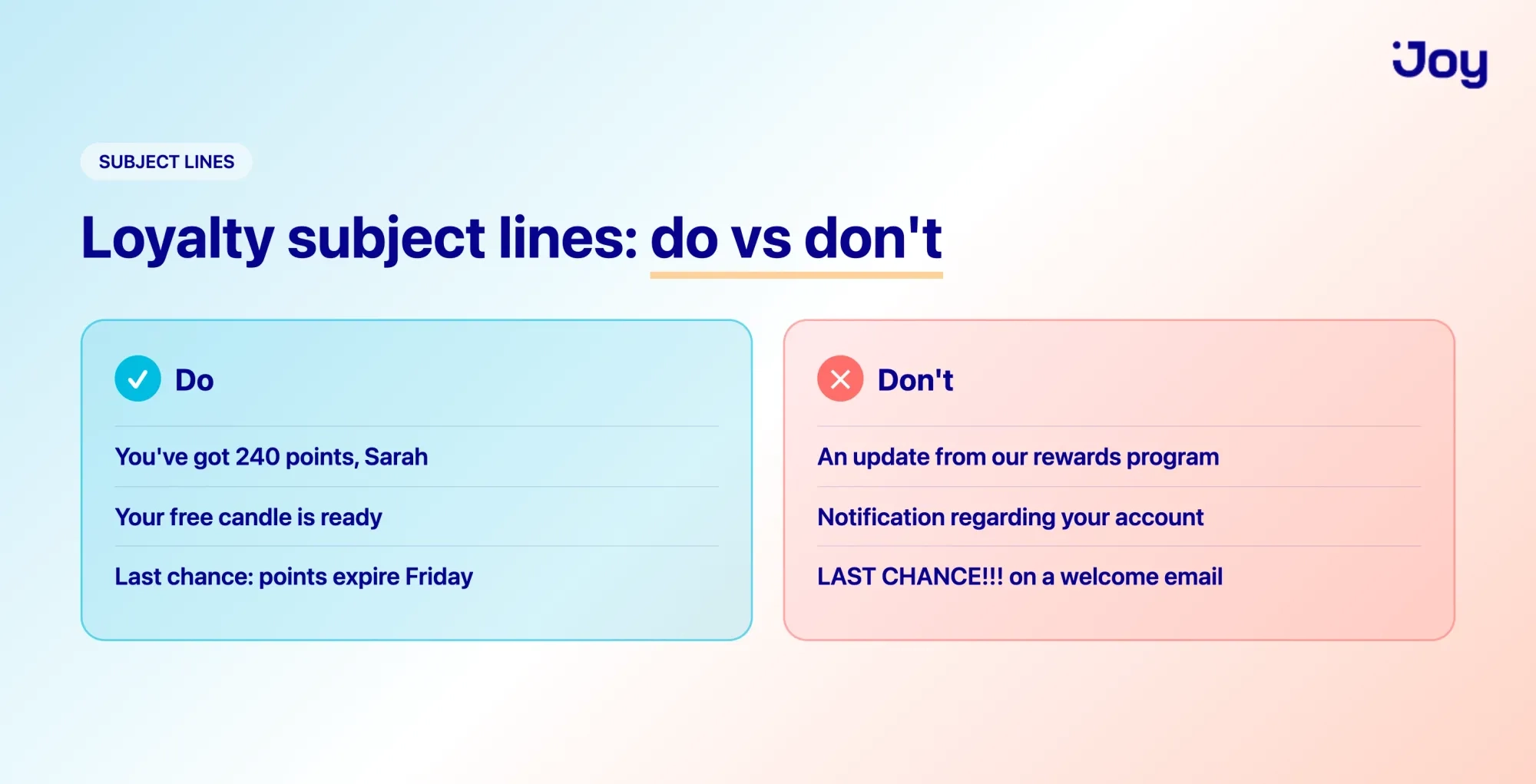
1. Put the personal details first. A name, a balance, a reward, that's what stops the scroll.
- Do: "You've got 240 points, Sarah."
- Don't: "An update from our rewards program."
2. Lead with the value, not the housekeeping. Front-load the good part; it's all that shows on a phone.
- Do: "Your free candle is ready."
- Don't: "Notification regarding your account status."
3. Keep it short. Mobile inboxes clip subject lines to around 40-50 characters. Write the important bit first and assume the rest gets cut.
4. Use urgency only when it's true. Real deadlines earn clicks. Fake ones burn trust.
- Do: "Last chance: your points expire Friday."
- Don't: "Last chance!" on a welcome email
5. One emoji, at most. A single 🎁 or ⏳ adds color. A row of them reads as spam.
Things to steer clear of:
- ALL CAPS and "FREE!!!" — spam filters flag it, and customers distrust it.
- Clickbait that the email doesn't deliver. "You won!" when they didn't earn one open and a lot of unsubscribes.
- Vague mystery. "Open this" or "You'll want to see this" wastes the one piece of inbox real estate you control.
- Stacked exclamation marks. One is plenty. Three looks desperate.
A simple test before you hit send: read the subject line out loud. If it sounds like something a person would actually say to a customer, it's probably fine. If it sounds like a press release, rewrite it.
When to send each email: the automation map
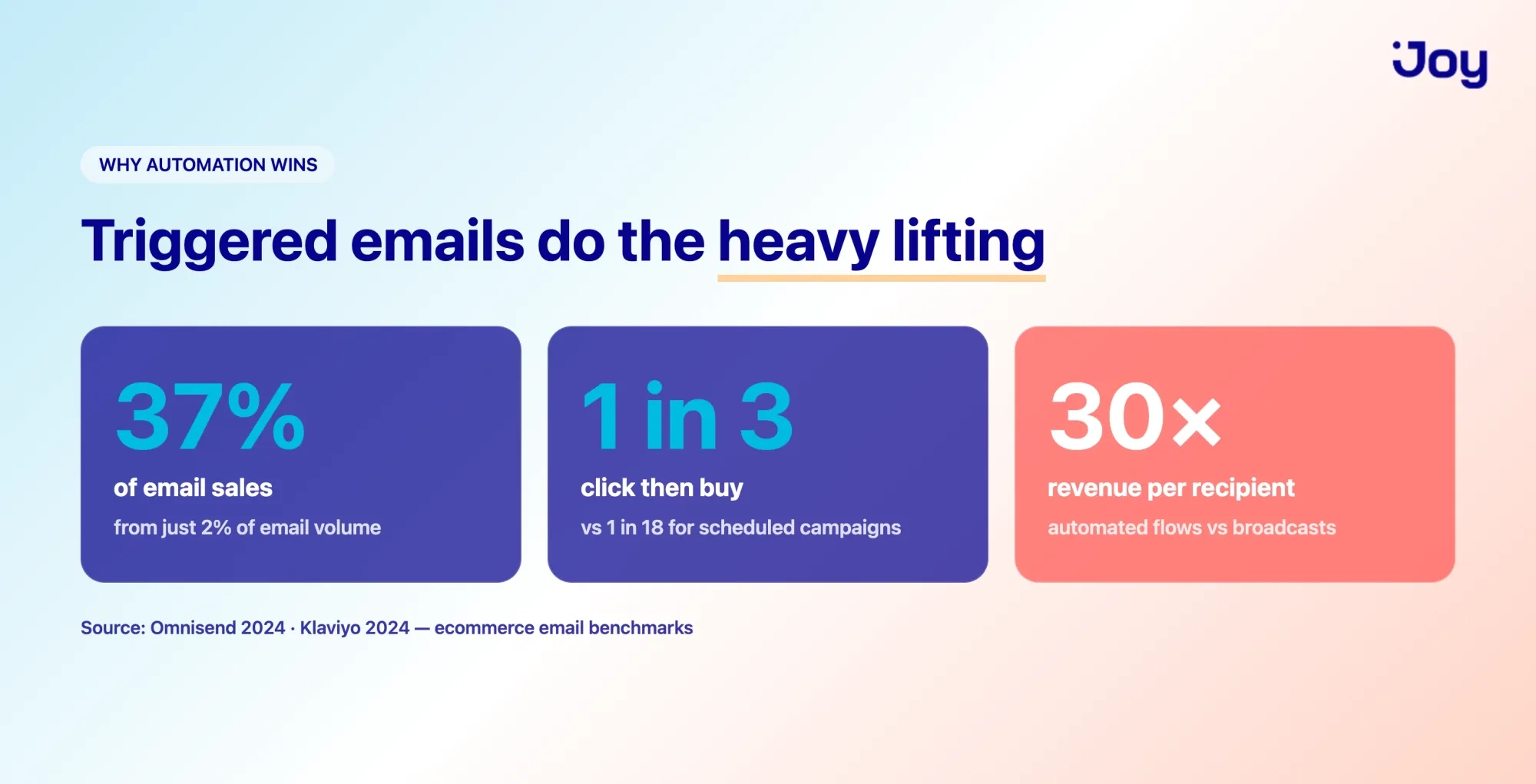
The reason to automate these isn't laziness; it's that triggered emails simply perform better than anything you schedule by hand.
Omnisend's 2024 data (from more than 23 billion emails sent by their merchants) found that automated emails drove 37% of all email sales while accounting for just 2% of email volume. The conversion gap is just as wide: one in three people who click an automated email go on to buy, compared to one in 18 for a scheduled campaign.
Worth noting: those figures cover ecommerce email broadly, not loyalty emails specifically. But the lesson carries: an email that fires on a customer's action beats one you blast to everyone.
Here's how the 15 emails map to triggers:
| Trigger | Timing | Goal | |
|---|---|---|---|
| Invitation to join | Bought but not enrolled | 1–2 weeks after order | Enroll the customer |
| Welcome | Joins program | Immediately | First points earned |
| Points update | Order placed / monthly | Real-time or monthly | Keep points top of mind |
| Double points event | Campaign window | Start of campaign | Lift sales in a set period |
| Reward unlocked | Crosses redemption threshold | Immediately | Drive redemption |
| Redemption confirmation | Redeems a reward | Immediately | Reassure, keep momentum |
| Tier upgrade | Reaches new tier | Immediately | Recognize status |
| Keep your status | Tier near expiry | 30 days before | Retain tier members |
| Expiration reminder | Points near expiry | 30 days + seven days before | Recover dormant points |
| Birthday | Birthday on file | Seven days before | Personal touch, repeat order |
| Win-back | No order in 60–90 days | At inactivity mark | Reactivate |
| VIP early access | Sale or launch | Before public open | Reward and lift top tiers |
| Review request | Order delivered | 1–2 weeks after delivery | Feedback + re-engagement |
| Referral | Redeems reward / positive moment | Right after | New customers |
| Program update | New perk or rule | At launch | Keep members engaged |
On Shopify, you can wire most of these up with Shopify Flow, or let Joy handle the loyalty-specific triggers (points thresholds, tier changes, expiry) and pass the rest to your email tool. The point is to set them once and let customer behavior do the sending.
Which metrics to track
Different loyalty emails have different jobs, so they need different yardsticks. Tracking open rate alone tells you almost nothing about whether the program is working.
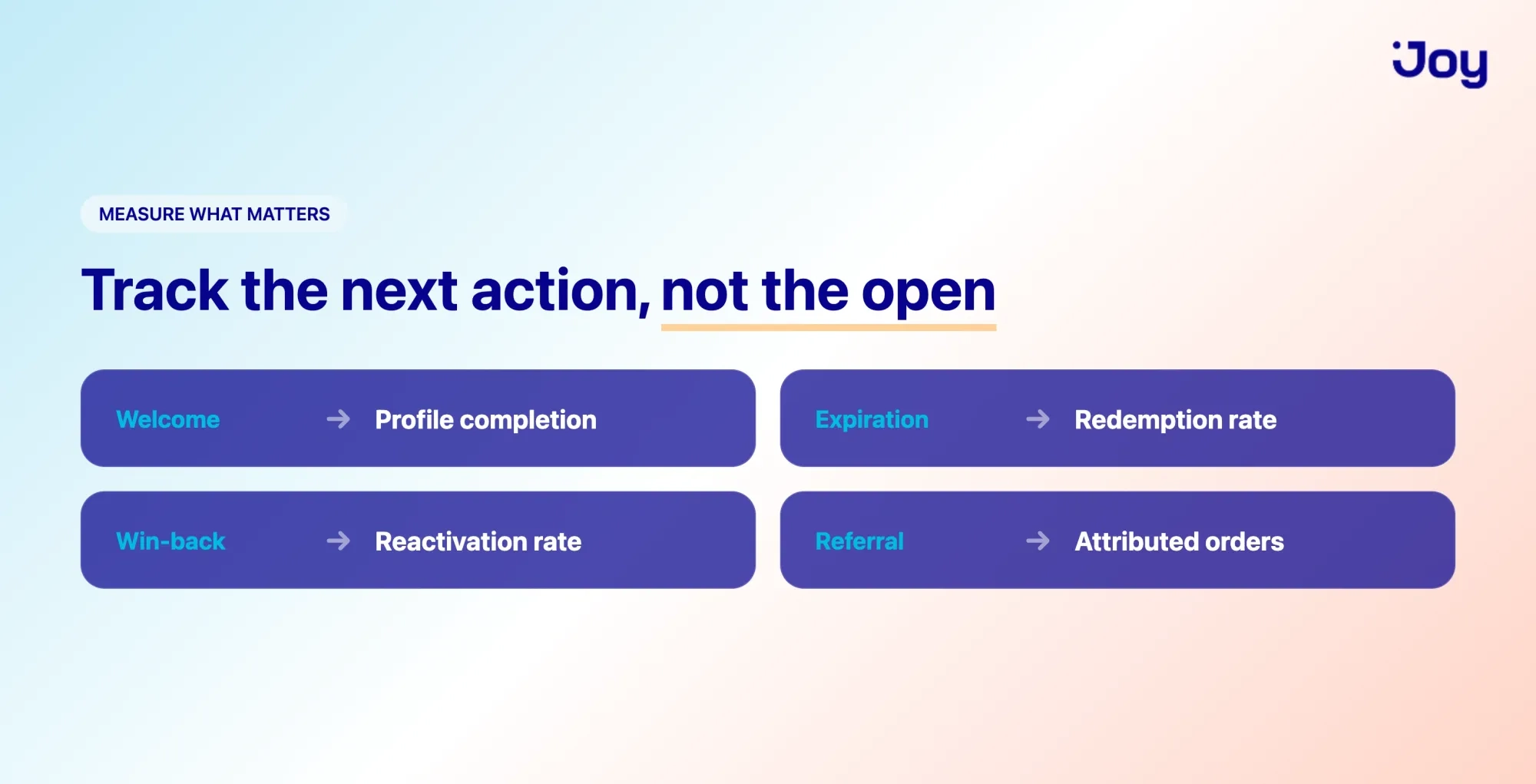
- Invitation to join: Enrollment rate. How many buyers actually joined?
- Welcome: Profile completion and first-points-earned rate. Are new members starting?
- Points update and expiration: Redemption rate. Are points turning into orders?
- Tier upgrade and keep-your-status: Repeat purchase rate and tier retention. Does status change behavior?
- Win-back: Reactivation rate, how many quiet customers placed an order after the email.
- Review request: Reviews collected per send (and points issued).
- Referral: Orders attributed to referrals, not just link clicks.
A useful frame: the metric that matters is the next action you asked for, not the open. An expiration reminder that gets opened but drives no redemptions failed at its actual job.
Turn these examples into automated flows
These 15 emails do their best work when they run on their own, quietly firing off each customer's actions while you focus on the store. A welcome moment when someone joins. A reward alert the second they earn it. A nudge before their points expire.
If you're running a loyalty program on Shopify, Joy handles the loyalty triggers behind these emails, points, tiers, referrals, and expiry, so the right message reaches the right customer automatically. Start with two or three of the examples above, see how they perform, and add from there.
FAQ
How many loyalty emails should I send?
Send based on triggers, not a quota. A customer might get a welcome email, then nothing until they earn a reward or their points near expiry. That's fine, in fact, it's better than a fixed weekly send. Let their activity set the pace.
What's the best time to send a loyalty email?
For triggered emails, the best time is immediately after the action, the reward email, while the excitement is fresh, the expiry reminder, while there's still time to act.
How is a loyalty email different from a newsletter?
A newsletter talks to everyone about the brand. A loyalty email talks to one person about their account, their points, their tier, and their reward. That personalization is exactly why loyalty emails tend to get more attention than general newsletters.
Do I need all 15 of these?
No. Start with the three or four that do the most work: welcome, reward unlocked, and expiration are a strong first set, and add the rest as your program grows. A handful of well-timed emails beats 15 half-finished ones.
How do I automate these on Shopify?
You can build most of these flows with Shopify Flow, triggering emails on tags, orders, and customer events. For the loyalty-specific pieces, points balances, tier changes, reward unlocks, a loyalty app like Joy tracks those events and can trigger the right email at the right moment, so you're not stitching it together by hand.

Written by
Thomas Nguyen is the CTO of Joy, a loyalty solution for Shopify and eCommerce brands. With years of experience building high-performance Shopify apps, Thomas aims to help merchants grow through customizable and retention-focused tools.
Related reading
 Examples & Inspiration
Bad Loyalty Programs: 4 Examples of What NOT to Do
Loyalty programs should build customer relationships but when poorly designed, they do the opposite. In this article, we uncover 4 real-world loyalty programs that backfired, frustrating users and damaging brands. Learn what went wrong and how you can avoid the same costly mistakes.
 Thomas Nguyen
 Examples & Inspiration
7 Father's Day promotion & marketing ideas to boost retention in 2026
Discover seven unique Father's Day promotion and loyalty strategies inspired by brands like Starbucks, Amazon, and Lululemon—designed to increase customer retention in 2026
Thomas Nguyen Examples & Inspiration
Christmas Marketing Ideas to Stand Out and Increase Conversion Rate
In a crowded Christmas market, which marketing ideas truly keep customers engaged and give them a clear reason to choose your store?
Thomas Nguyen Examples & Inspiration
Best Online Loyalty Scheme for Every Industry: What Actually Works in 2026
Find the best online loyalty scheme for your industry. Six recommendations with real brand examples, performance data, and how to build each on Shopify.
Thomas Nguyen Examples & Inspiration
Innovative Loyalty Programs Ideas That Actually Drive Repeat Purchases
67% of consumers belong to at least three loyalty programs, but only 24% actively engage.
Thomas Nguyen Examples & Inspiration
Coca-Cola Brand Loyalty: 5 Strategies E-commerce Brands Can Use to Boost Retention
Coca-Cola brand loyalty is built on emotion, consistency, and ubiquity - not discounts. See the 5 strategies behind it and how to apply them to ecommerce retention.
Thomas Nguyen